Page 1 of 1
RESOLVED: hiliting color values: comment and question
Posted: 13 Mar 2026 15:17
by DerellLicht1
I recently was editing a Thunderbird css file, and discovered that RJTE actually hilites the color codes in their color!!
That was amazing, and *really* handy when I was experimenting with codes; much easier than pulling up a color dialog every time...
However, in my html code, it does *not* hilite these these codes, even if they are in css declarations;
It would be really cool to have this in html as well...
examples:
Code: Select all
.DarkHeader {
   font-family: Georgia, "Times New Roman", Times, serif;
   background-color: #F5DEB3;
   color: #2060A0;
   font-size: 105%;
}
Re: hiliting color values: comment and question
Posted: 31 Mar 2026 00:43
by DerellLicht1
so... nobody has any insights into this at all??
*should* I expect html files to handle color codes the same as css files do?? seems logical to me...
???
Re: hiliting color values: comment and question
Posted: 01 Apr 2026 13:23
by Rickard Johansson
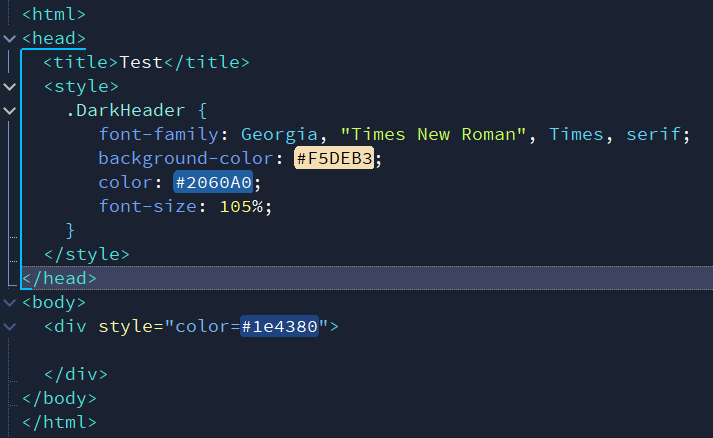
- 2026-04-01_142129.png (14.85 KiB) Viewed 15692 times
It should work if you use style tags or a style attribute.
Re: hiliting color values: comment and question
Posted: 01 Apr 2026 17:14
by pjj
Sadly, it doesn't work for me, either.
I have monkeyed with Environment > Themes > Customize > HTML > Hint color 1 and for once I got color highlighting, but when I switched it off and on to confirm it worked, it didn't

Yes, I understand it probably doesn't have anything to do with highlighting color values...
Re: hiliting color values: comment and question
Posted: 06 Apr 2026 02:38
by DerellLicht1
Rickard Johansson wrote: 01 Apr 2026 13:23
2026-04-01_142129.png
It should work if you use style tags or a style attribute.
Well, here is what I have, on my snippets page:
But *none* of the color fields show up in those colors, even though .css files work fine...
Re: hiliting color values: comment and question
Posted: 12 Apr 2026 12:41
by Rickard Johansson
Please check the options in "View / Highlight color values / File types". Make sure "HTML" is set.
Re: hiliting color values: comment and question
Posted: 12 Apr 2026 16:08
by DerellLicht1
Rickard Johansson wrote: 12 Apr 2026 12:41
Please check the options in "View / Highlight color values / File types". Make sure "HTML" is set.
Hah!! I was looking in Options dialog; I didn't even *think* to look at other menus entirely!!
Okay, problem solved now... (although, I'll admit that this solution really seems like something that *should* be in Options dialog...)
Re: RESOLVED: hiliting color values: comment and question
Posted: 12 Apr 2026 17:04
by Rickard Johansson
(although, I'll admit that this solution really seems like something that *should* be in Options dialog...)
Actually, I though so too when I tried to find the option myself

I'll add it to the option dialog in the next version...
Re: RESOLVED: hiliting color values: comment and question
Posted: 13 Apr 2026 15:03
by DerellLicht1
Rickard Johansson wrote: 12 Apr 2026 17:04
(although, I'll admit that this solution really seems like something that *should* be in Options dialog...)
Actually, I though so too when I tried to find the option myself
I'll add it to the option dialog in the next version...
Excellent!! Thank ye !!
Re: RESOLVED: hiliting color values: comment and question
Posted: 19 Apr 2026 10:08
by pjj
Rickard Johansson wrote: 12 Apr 2026 17:04
Actually, I though so too when I tried to find the option myself
I'll add it to the option dialog in the next version...
With a propos to nothing:
viewtopic.php?p=19618 

Re: RESOLVED: hiliting color values: comment and question
Posted: 19 Apr 2026 18:21
by Rickard Johansson
The option to highlight color values has been moved to "Options->Highlight and margins", in v16.60.